Finsweet Components review (2026): pricing, alternatives & verdict
An independent Finsweet Components review with real Auto Tabs and Marquee examples, comparison to native Webflow, Attributes and custom code, pricing, and the IGOREV10 discount.
Finsweet Components aims to make JavaScript-powered Webflow interfaces easier to create and manage. The important question is not whether a slider or marquee can be built in a few clicks, but whether its workflow and licence are worthwhile compared with native Webflow, free Finsweet Attributes and a custom solution.
This is an independent product comparison by Igorev Agency. We examined Finsweet's published features and terms, and configured Auto Tabs and Marquee in the Webflow Designer. The screenshots document real hands-on use, not controlled speed benchmarks. Affiliate disclosure: we partner with Finsweet and may earn a commission from eligible purchases.
Quick verdict: is Finsweet Components worth it?
Yes, when a team repeatedly builds common interactive patterns and wants visual settings instead of reimplementing behavior every time. Less so for a simple landing page using native Webflow elements, or for highly bespoke animations that benefit from a dedicated JS solution. The correct comparison is the total build, QA and maintenance effort, not the number of clicks needed to add an element.
What is Finsweet Components?
Finsweet Components is a Webflow app for configurable interactive elements. Its current library lists Slider, Auto Tabs, Marquee, Favorites, YouTube Feed, Instagram Feed, Table, Number Count and accessibility functionality. It also advertises features such as scanning, repairing pasted configurations and bulk updates. Some workspace capabilities are flagged as upcoming, so do not treat every library feature on its marketing page as universally available today.
Comparing Finsweet Components with the alternatives
Native Webflow
Native Webflow tabs, sliders and reusable layout Components keep simple projects close to the platform's built-in editing experience. Their advantages are familiarity and fewer third-party decisions. For complex autoplay, specialized timelines or CMS behavior, native options may require additional setup or custom code.
Finsweet Attributes
Attributes is a different Finsweet product: a free, open-source, attribute-based JavaScript library. It is especially useful for filtering, sorting, loading, search and CMS utilities. For developers comfortable inspecting attributes and page structure, it may deliver what a project needs without a paid component licence. Components is not a paid replacement for every Attributes feature.
Custom JavaScript, Swiper or GSAP
Custom code gives maximum control when a design calls for unusual transitions, scroll sequences or state coordination. Swiper handles many slider scenarios; GSAP suits bespoke animation. The cost is developer time and responsibility for future maintenance. A packaged component cannot replace careful testing or engineering judgment.
Finsweet Components
Components occupies the middle ground: visual configuration and repeatable behaviors without implementing each script from scratch, but still with a third-party dependency and production licence. Choose it when its behavioral model fits the intended design rather than bending a complex design around an off-the-shelf pattern.
What we tried: Auto Tabs
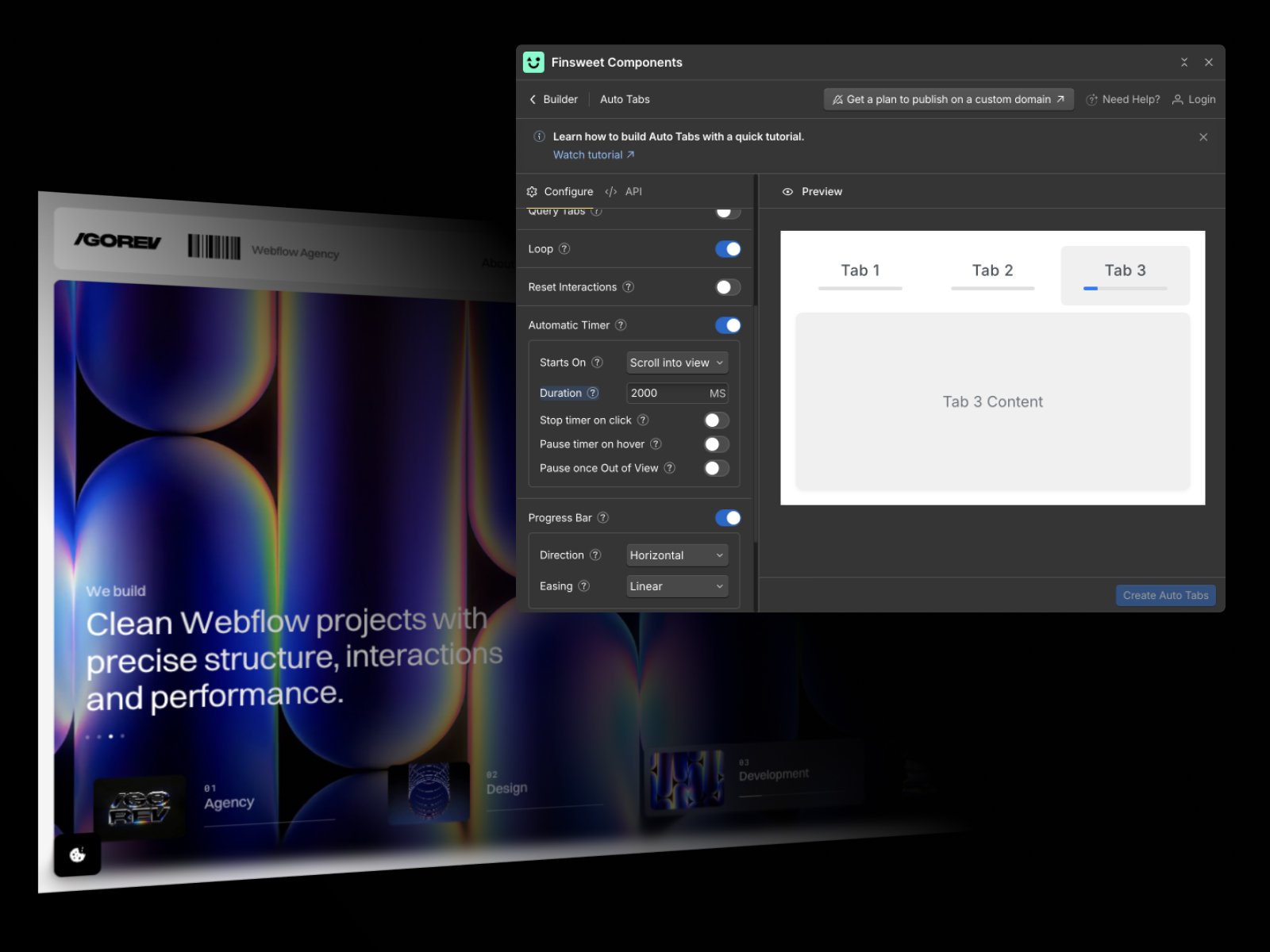
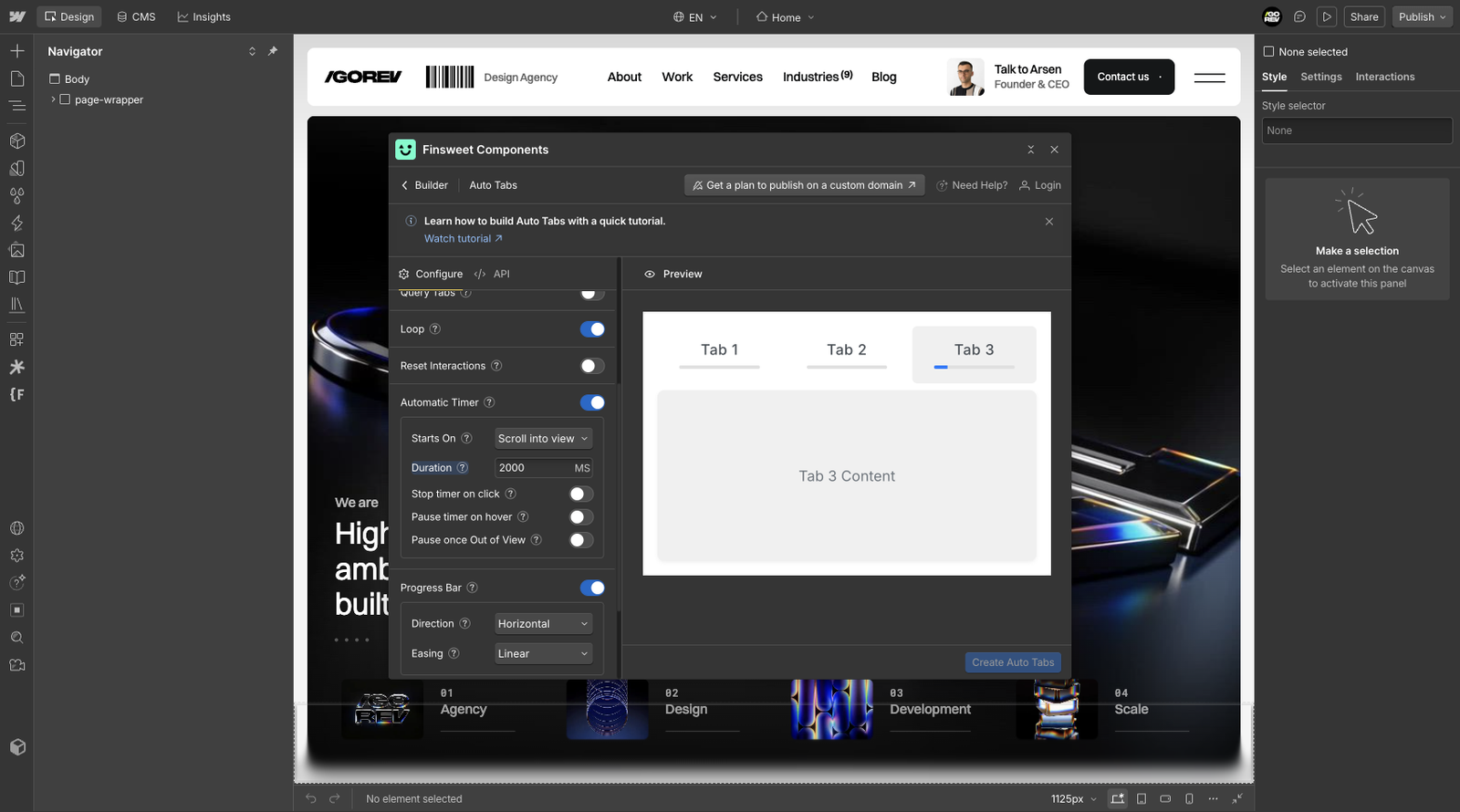
Our Auto Tabs screenshot shows an automatic timer that starts on scroll into view, looping tabs, an adjustable 2,000 ms interval, progress bar controls and pause options. That bundled configuration could be useful for feature walkthroughs or process presentations. It does not mean autoplay is always advisable: reading speed, keyboard access, reduced motion and mobile content shifts still need QA.
What we tried: Marquee
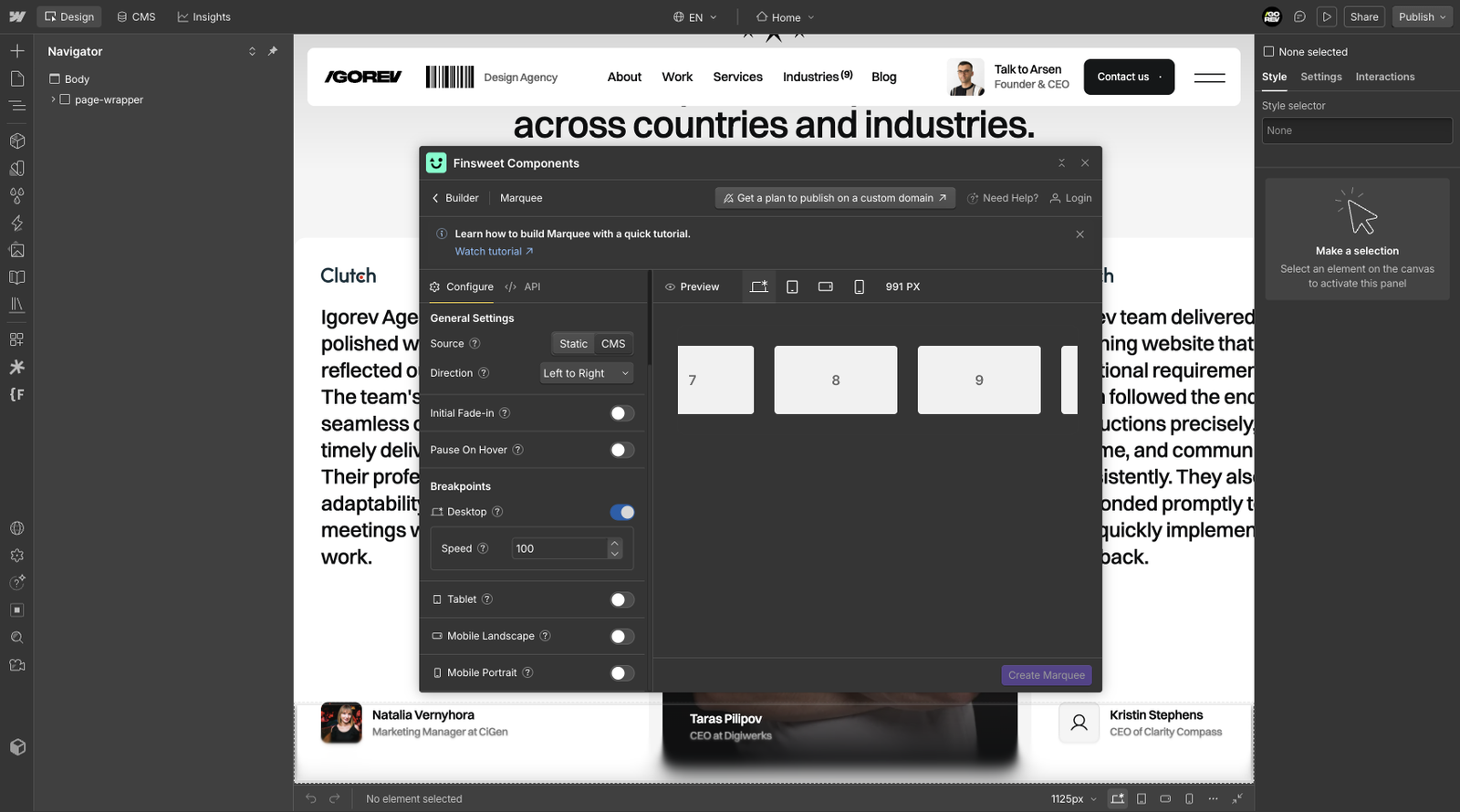
The Marquee screenshot shows a choice of static or CMS content, direction, fade-in, pause on hover and breakpoint-specific settings. This is convenient for recurring logo or testimonial rows. Yet moving content can create accessibility or mobile overflow issues. A custom GSAP marquee may be preferable when motion has to synchronize with a larger site animation system.
Pricing: individual Components vs full bundle
As checked in October 2026, the Single Site Lifetime All Components Bundle costs $59 once. Individual single-site licences include Marquee at $19, Auto Tabs and Slider at $29 each, Favorites at $29, and Instagram and YouTube feeds at $39 each. Number Count and Table are listed as free. Consent Pro is not included in the Components bundle.
For one website needing only Marquee, $19 may be sufficient. Auto Tabs plus Marquee totals $48 individually, versus $59 for the whole bundle. Paying the additional $11 is reasonable only if broader access is likely to be useful. The bundle is not automatically a better deal for a one-component project.
Agency pricing: does an annual plan make sense?
The official Agency tiers list Basic at $29/month billed yearly ($348) for 12 new websites per year, Lite at $49/month billed yearly ($588) for 24, Pro at $79/month billed yearly ($948) for 48, and Unlimited at $129/month billed yearly ($1,548). If fully utilized, the first three tiers equal $29, $24.50 and $19.75 per allocated website respectively. A monthly equivalent price is not the same as monthly billing.
A notable licence detail: Finsweet says that domains connected during an Agency subscription continue working after the annual term is cancelled, whereas domains on refunded plans do not. Finsweet also lists unlimited component instances and loads per licensed site. Always check the current terms before making purchasing or handoff decisions.
Can you test Finsweet Components for free?
Yes. Finsweet says the builder and published components can be tested on the free .webflow.io staging domain; publishing to a custom domain requires an eligible paid licence. That makes real project evaluation possible before paying for production.
What you are paying for - and what you are not
The value is visual configuration, repeatable behavior and potentially simpler maintenance for common interactions. It does not guarantee better Core Web Vitals, accessibility compliance or pixel-perfect responsive behavior. We have no controlled benchmark proving Components loads faster than Swiper, GSAP or native Webflow; the finished page must be tested.
Which approach should you choose?
For a small landing page, prefer native Webflow unless a gap is clear. For CMS filtering and load-more behavior, investigate free Attributes first. For repeatable auto-tabs, marquees and sliders with matching requirements, Components is worth testing. For precise custom scroll choreography, choose an implementation you can fully control. For dashboards and complex apps, Components alone is not a frontend application framework.
IGOREV10: verified 10% discount
We verified the IGOREV10 partner code on the Finsweet All Components Bundle checkout.
It reduces the $59 price by $5.90 to $53.10 before payment. This proves the promotion applies to that displayed product and checkout, not that a purchase was completed. Check the discount before paying, as terms can change.
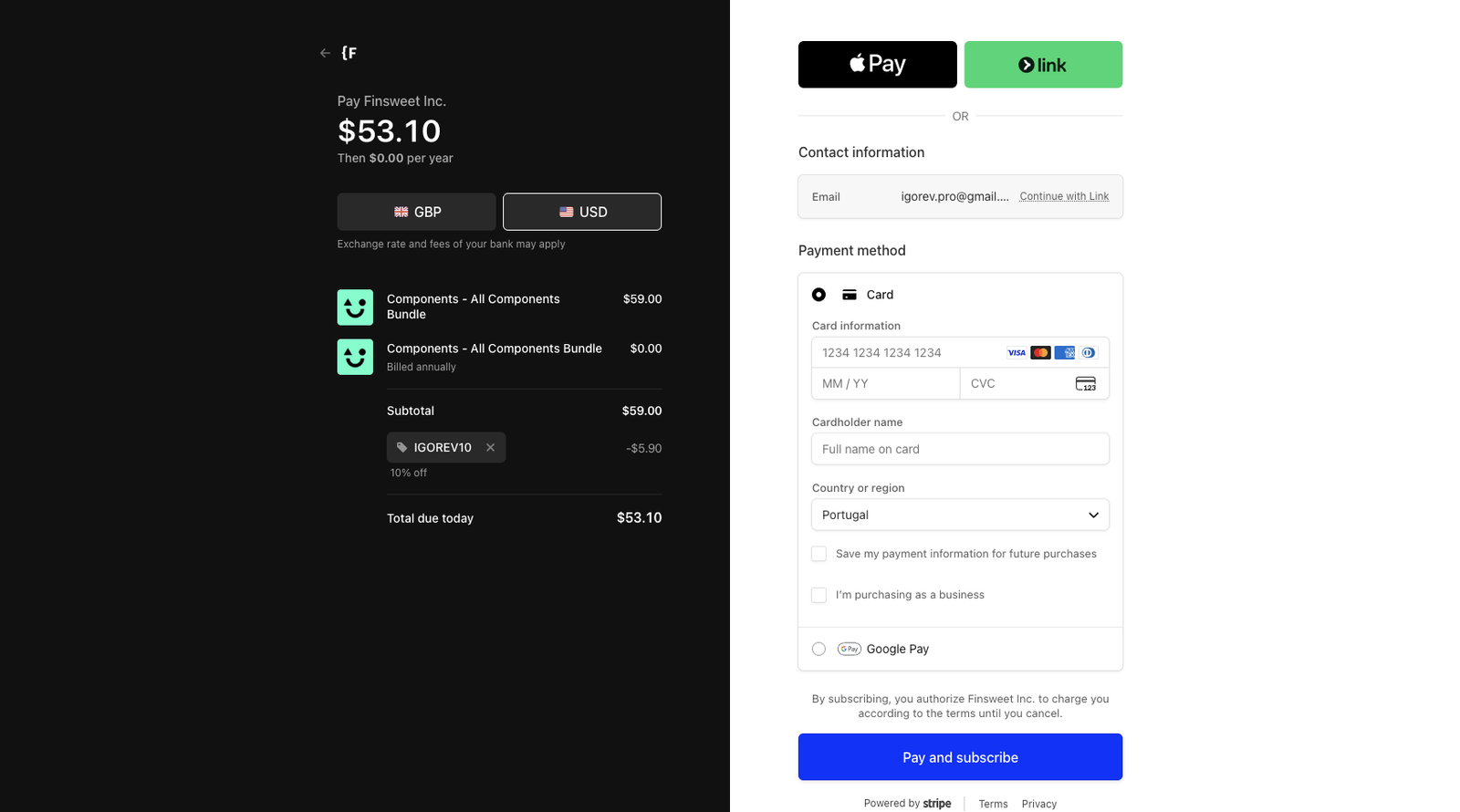
IGOREV10 also applies to eligible Finsweet partner offerings such as Consent Pro and Wized, but these remain separately priced products. Disclosure: Igorev Agency may earn a partner commission. Our review separates hands-on screenshots, product documentation and judgments about project fit.
Advantages and disadvantages
Strengths: an approachable Webflow Designer workflow, repeatable interactive patterns, staging-first testing, component management and potentially favorable lifetime licensing for agencies. Drawbacks: external dependency, extra licence choices, possible overlap with free/native solutions and no exemption from testing motion, accessibility and responsiveness.
Final verdict
Finsweet Components is a solid optional tool for teams that repeatedly need the behaviors it provides. The single-site bundle is reasonably priced relative to multiple individual component purchases, but simple projects may need none of it. We would select Components based on implementation fit, maintainability and client ownership, not because a paid builder is inherently better than native Webflow or custom JavaScript.
Resources and further reading
Official Finsweet resources: Components pricing & licensing and Components library.
Related Igorev Agency articles: Finsweet Consent Pro review and What makes a clean Webflow build?.
Looking for implementation support? See our Figma-to-Webflow development service.