Can AI build a professional website? What we learned building Duo Case with AI
We built Duo Case with heavy AI assistance over a weekend. Here’s what AI handled well, where it struggled, and where human expertise still mattered.
September 14, 2026
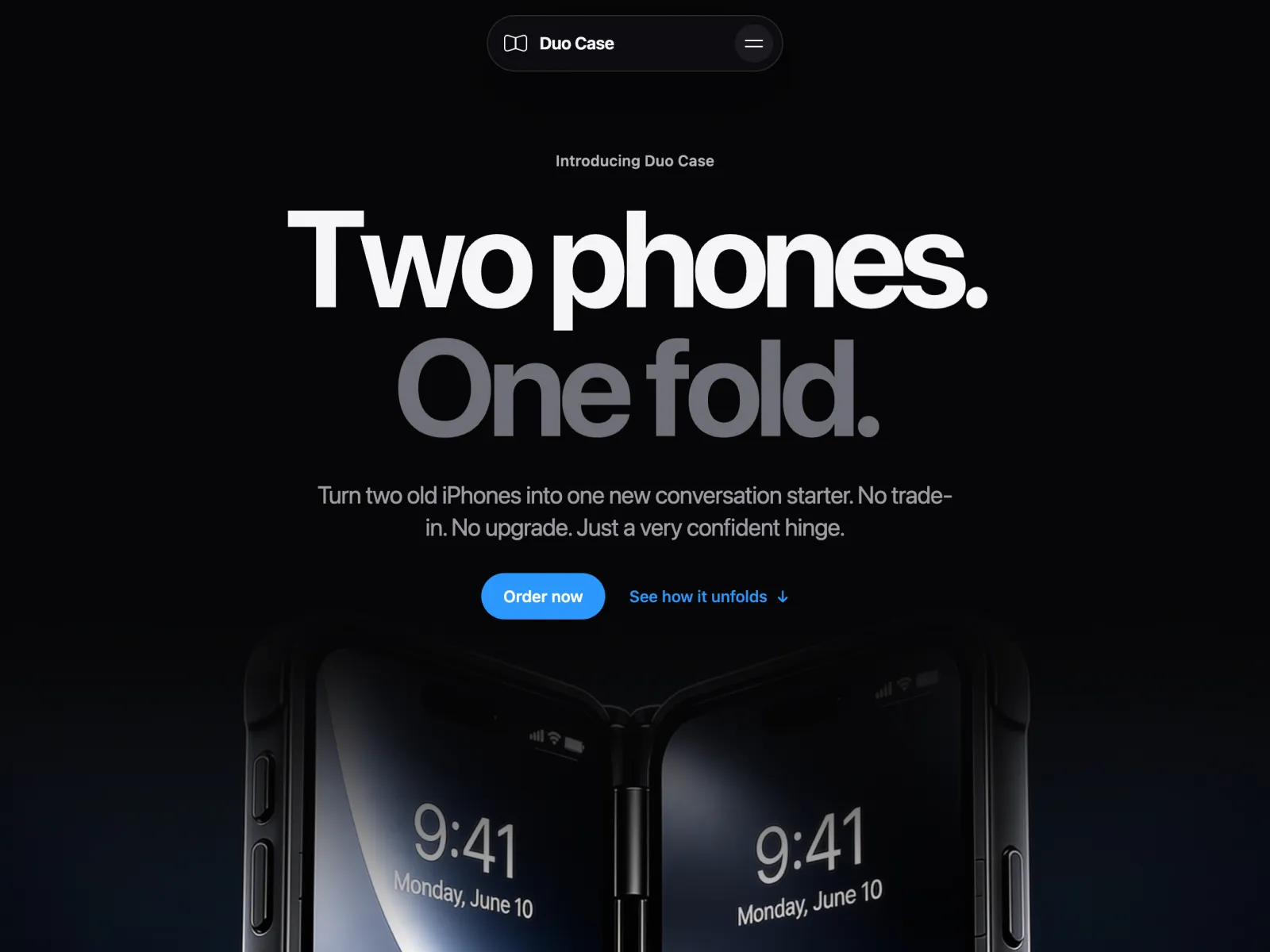
Over one weekend, we built a complete website with AI involved in almost every part of the process: structure, copy, visuals, development and interactions.
The project was Duo Case, an intentionally absurd parody product that turns two old iPhones into a very unofficial foldable iPhone. There was no client, no commercial brief and no real product to sell. That was exactly why we built it. We wanted a project where we could push AI as far as possible and see what it could actually do when the goal was not just to generate a landing page, but to take an idea all the way to a finished website.
The result surprised us in both directions. Some parts of the process were much easier to hand over to AI than we expected, while others made it very obvious that faster production does not remove the need for design and development experience. The biggest lesson was that AI performs extremely well once the problem is clear. The difficult part is often defining that problem in the first place.
We did not want to test another AI website builder
There is already no shortage of tools that can generate a website from a sentence. You describe a startup, choose a style, wait a few seconds and get a homepage. That was not particularly interesting to us.
We wanted to know what happens after that first generation. Can AI help define the structure? Can it write copy that we would actually keep? Can it create the visual language? Can it implement custom functionality? Can it understand existing code instead of generating everything from scratch? And, most importantly, can it make the decisions that separate a generic generated website from something we would actually want to publish?
Duo Case gave us a useful environment for testing that because the concept itself was intentionally unusual. There was no existing visual identity or competitor website to imitate. We had to establish the idea, product logic and experience ourselves, and that distinction became important very quickly.
Structure and copy were surprisingly easy
The first thing AI did extremely well was the website structure. Once we explained what Duo Case was and what kind of product story we wanted to tell, the initial page architecture was already close to what we needed. The sequence made sense: introduce the product, explain how it works, present its fictional advantages, demonstrate the hinge mechanism and eventually lead into the product offer.
We adjusted the UX later, but we did not need to rebuild the entire structure manually. As a starting point, it was significantly better than a blank canvas.
Copy was probably the strongest part of the whole experiment. Duo Case needed a very specific tone: it had to sound almost believable as an Apple-style product launch while remaining obviously ridiculous. Once that direction was established, AI understood the joke remarkably well.
Most of the copy required almost no rewriting. Product descriptions, specifications, small interface labels and fictional testimonials could all be generated within the same voice. Instead of spending hours writing every section from scratch, we could focus on deciding what each section needed to communicate and then refine the result. This is one area where AI already feels less like an experiment and more like a normal production tool.
Art direction was a completely different story
Visuals were where the limitations became much more obvious. AI can generate an image very quickly, but that does not mean it can establish a coherent art direction for an entire website.
We knew roughly what Duo Case should feel like: polished, minimal and close enough to premium consumer technology advertising that the parody would work. But getting from that idea to a consistent set of images and graphics required much more than writing one prompt.
We generated, rejected, adjusted and regenerated. A visual could be impressive on its own and still be completely wrong for the page because the composition did not work with the layout. Another image might have the right lighting but the wrong perspective. Sometimes the product details changed between generations. Sometimes everything was technically correct, but the result simply felt generic.
This was probably the clearest example of where design experience mattered. The value was not in being able to press the generate button. The value was in knowing what we were looking for, recognising when the result was not good enough and understanding what needed to change in the next iteration. AI made it much faster to explore visual directions, but it did not choose the direction for us.
The most important ideas still had to come before the prompt
One of the central moments on the website is the sequence where the two phones gradually open as you scroll through the page. AI helped us build it, but AI did not invent the experience.
We first had to decide how this fictional product should be demonstrated. Showing another static product render would not have been enough, so we came up with the idea of making the opening mechanism part of the scroll experience. From there, we had to think about the sequence itself, how quickly it should progress, what the camera should do and what the visitor should understand from it.
Then came the actual production. We generated the video, refined the staging, prepared it for the website and connected its playback to scroll position.
At that point AI became extremely useful because the problem was no longer vague. We were not asking it to “make the section interactive.” We could explain that we had a video, that its playback needed to correspond to the user’s scroll progress within a particular section, and how that behavior should start and end. That is a very different prompt because most of the important creative decisions have already been made.
We noticed this pattern throughout the project. When we gave AI a vague request, the result was usually vague. When we understood exactly what we wanted and could describe the behavior clearly, the quality improved dramatically.
Prompting is mostly knowing what you actually want
There is a lot of discussion around “prompt engineering” as if prompting itself is the new specialist skill that replaces design or development knowledge. Our experience with Duo Case was almost the opposite: the better we understood a subject, the easier it was to prompt AI effectively.
If you understand visual hierarchy, you can explain why a composition is not working. If you understand UX, you can describe how information should be prioritised and what the visitor should experience next. If you understand development, you can specify what an interaction should do, what existing logic needs to remain intact and where new functionality belongs.
Without that background, a prompt often becomes something like “make it more premium”, “improve this section” or “add a cool animation.” AI will still give you something, but the problem is that you have given it almost no criteria for what “good” means.
For us, prompting was not a replacement for professional knowledge. It was a way to communicate that knowledge to a much faster production tool.
Development was where AI felt most mature
If art direction was the hardest part to delegate, development was one of the easiest. A major reason was that we did not treat AI as a developer that had to invent everything from scratch.
We already have a library of code patterns from previous projects. When we needed a particular behavior, we could take existing code, give it to AI and explain what it currently did, what we wanted to change and where the new functionality needed to be implemented. That context changed everything.
Instead of asking, “Write some JavaScript for this animation,” we could effectively say: this is the code we already use, this is the element structure, this part should remain unchanged, and this is the additional behavior we need.
AI is extremely good at working inside those constraints. It understands code well, can trace the existing logic and can adapt a working implementation much faster than rewriting it manually.
That does not eliminate the need to understand the code. In fact, the workflow works precisely because we know what we are giving it and what the expected result should be. But it removes a considerable amount of repetitive implementation work. For an experienced developer, that is a very different proposition from asking AI to build an entire codebase without supervision.
We still corrected the UX ourselves
Another interesting part of the experiment was how quickly something generated by AI can look “finished.” A section can have polished typography, an image, a button and an interaction and still be wrong.
We changed the UX several times while building Duo Case. Some sections needed to move. Others needed less content. Certain ideas were visually interesting but interrupted the story. Some interactions worked technically but drew too much attention to themselves.
AI could help us produce alternatives, but it could not reliably make those judgments for us because there was no single correct answer. We kept coming back to fairly ordinary UX questions: what does the visitor need to understand at this point? What should they notice first? Does the previous section give them enough context? Does this interaction help explain the product or does it exist simply because we can animate it?
Those decisions shaped the final website much more than the speed at which individual components were generated.
So what did AI actually do?
By the end of the weekend, AI had been involved in almost every stage of the project. But trying to calculate whether it had done 60%, 80% or 90% of the work would be meaningless.
It produced most of the initial structure and a large portion of the final copy. It helped generate the visual material. It accelerated coding and helped adapt existing functionality. It allowed us to test ideas much faster than we could have done manually.
At the same time, we defined the concept, established the visual direction, decided how the fictional product should work, created the interaction ideas, directed the visual generation process, corrected the UX, supplied technical context and decided which outputs were actually worth keeping.
AI handled a large amount of production. Human input was concentrated around direction and judgment. Those parts may represent a smaller percentage of the visible workload, but they have a disproportionate impact on the final result.
Can AI build a professional website?
After this experiment, our answer is yes, with an important qualification. AI is already capable of producing a substantial part of a professional website. For a straightforward landing page, internal product, early MVP or experimental project, the amount it can handle is genuinely impressive.
What it does not remove is the need to decide what should be built. The more distinctive or commercially important a website becomes, the more those decisions matter. Someone still needs to determine what the brand should communicate, how the experience should feel, what belongs on the page, what should be removed, which visual direction fits the company, which interactions have a purpose and whether the implementation will remain usable after launch.
AI makes producing things cheaper and faster. As that happens, choosing the right things to produce becomes more valuable. That is probably the biggest change we noticed while building Duo Case.
AI did not replace our workflow. It compressed it.
We did not finish Duo Case thinking that designers and developers were about to become unnecessary. We finished it thinking that the amount one experienced person can produce is changing very quickly.
Blank-page work is disappearing. First drafts are becoming almost instant. Code that used to require repetitive implementation can often be adapted in minutes. Visual directions can be explored without producing every asset manually.
That means more time can go toward the parts of a project where experience has the most leverage: direction, ideas, systems, UX and final quality. For us, that is the useful way to think about AI in web design and development. Not as a substitute for expertise, but as a way to make expertise considerably more productive.
Duo Case was built over a weekend because AI accelerated almost every stage of production. But the reason we were comfortable publishing it was not that AI could generate a website. It was that we still knew what we wanted the website to be.
Duo Case is an independent parody concept and is not affiliated with or endorsed by Apple Inc.