Webflow AI code components review: what we built and when they make sense
A hands-on review of Webflow AI code components based on a working budget tracker we built with custom logic, Supabase and real AI credit usage.
August 6, 2026
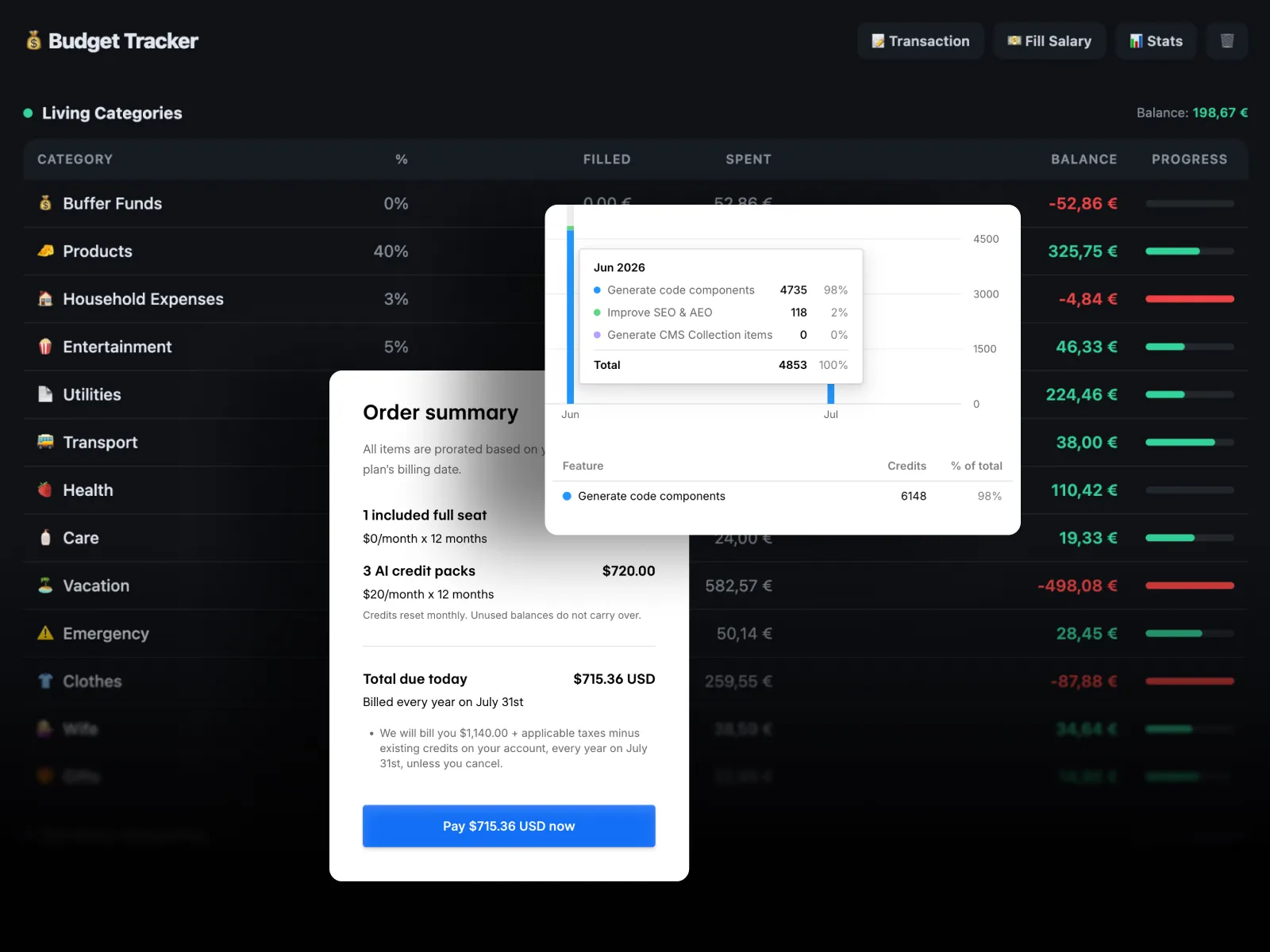
We built a working budget tracker inside Webflow using AI code components.
This was not a demo accordion or a basic calculator. The tool needed custom expense categories, percentage-based income distribution, transaction logic, historical data, statistics and persistent storage through Supabase.
The idea came from a budget workflow that had previously been managed in Notion, where the structure was too limited for the logic we wanted. Instead of adapting the workflow around the tool, we described the rules to Webflow AI and used code components to build the interface and functionality we needed.
The result changed our view of the feature. Webflow AI code components are more capable than we expected. The main limitation for more complex, occasional builds is currently the credit model.
What are Webflow AI code components?
Webflow AI code components are React components generated directly inside Webflow from natural-language prompts.
You describe the functionality to the AI Assistant, Webflow generates the component, and you can place it directly in the site, refine it through follow-up prompts or edit the generated code.
Webflow positions the feature for interactive experiences such as calculators, multi-step forms, filters, galleries and location finders. The official Webflow AI code components documentation explains the current workflow.
What we built
The project was a working budget tracker built around custom budgeting logic rather than the limitations of a generic spreadsheet or database template.
It needed to support:
- Custom spending categories.
- Percentage-based allocation of income.
- Salary entry and automatic distribution.
- Transactions that update category balances.
- Positive and negative balances.
- Historical data.
- Statistics and progress tracking.
- Persistent data through Supabase.
The useful question was not whether Webflow could display a dashboard. It was whether AI could interpret a custom set of rules and turn them into working application logic without us manually writing the React implementation from zero.
How the build went
The first working version appeared quickly.
The full experiment took fewer than 20 prompts. Most later prompts were refinements rather than attempts to rescue a broken concept: adjusting calculations, changing interface details, improving states and making the behavior closer to the workflow we wanted.
That is the part that impressed us most. The AI was not only generating UI. It was translating rules into behavior.
What worked better than expected
The AI understood the logic
A budget tracker has dependencies. Adding salary affects multiple categories. Adding a transaction changes current balances. Statistics need to reflect underlying records rather than decorative values.
Webflow AI handled this type of stateful logic better than we expected from a feature inside a website builder.
Iteration stays inside Webflow
For lightweight interactive functionality, avoiding context switching is useful. A component can be generated, placed in the actual layout and refined without creating a separate repository for every small feature.
This makes particular sense for marketing websites where the interactive component is part of a broader Webflow system.
The result is still code
AI code components are not a locked no-code abstraction. The generated React implementation can be inspected and edited directly.
That creates a useful middle ground: AI can create the starting point, while a developer can take over when prompting stops being the best way to make a change.
The main limitation: AI credits
The budget tracker consumed 6,148 Webflow AI credits.
This should not be treated as a universal price for building an application. Webflow states that credit usage is dynamic, so complex requests may consume more than simple ones.
Still, 6,148 credits is a useful real-world data point because this was an actual working tool rather than a synthetic test.
Webflow documents the current allowances, add-on packs and reset rules on its AI credits page.
The practical issue is that occasional complex development can consume far more credits than a normal monthly allocation, while unused credits on self-serve plans do not accumulate indefinitely.
For teams generating interactive components regularly, additional credits may be easy to justify. For a team that needs one complex component every few months, external AI coding tools can be more economical.
When Webflow AI code components make sense
We would use them when the functionality belongs naturally inside a marketing website and the scope is contained.
Good use cases include:
- Pricing and ROI calculators.
- Multi-step forms.
- Quizzes.
- Product configurators.
- Interactive comparison tools.
- Filters.
- Data visualizations.
- Location finders.
- Small internal or customer-facing tools.
The feature extends what can be delivered through our Webflow development work without forcing every custom interaction into a separate application stack.
When we would use an external development workflow
AI code components do not eliminate the value of a proper codebase.
For functionality that is business-critical, complex, heavily reused or likely to evolve over a long period, we would still consider an external workflow with tools such as Claude Code or Cursor, then bring the finished React component into Webflow when appropriate.
An external codebase becomes more attractive when a project needs version control, automated tests, complex API integrations, shared logic, multiple developers or more control over architecture.
The question is not whether AI code components can generate something complex. Our test suggests they can go surprisingly far. The question is whether Webflow should be the primary development environment for that specific piece of software.
Are Webflow AI code components worth it?
For small and medium interactive components, yes.
The workflow is fast, the generated React is editable and the feature removes a meaningful amount of setup work for functionality that previously required custom development outside Webflow.
For occasional complex components, we are less convinced by the current economics. The technology is capable, but a build that consumes several thousand credits can make external AI development tools more attractive.
This fits the broader shift we covered in Is Webflow still relevant? What AI changes and what it doesn't. AI reduces the cost of producing the first version, but long-term value still depends on architecture, maintainability and the decisions behind the system.
Final verdict
This budget tracker changed our view of Webflow AI code components.
We expected them to be useful for calculators, forms and small interactive elements. We did not expect to get a working stateful budget tool with persistent data and custom logic from fewer than 20 prompts.
The capability is real.
The part we would evaluate carefully is cost. For frequent component generation inside a team workflow, the credit model may be reasonable. For occasional complex builds, we would compare it against developing the same component with an external AI coding tool.
Either way, AI code components are no longer just a novelty. They are now a legitimate part of the Webflow development toolbox.