Wized review (2026): pricing, Webflow use cases & limitations
Independent editorial Wized review: how it works with Webflow and external backends, pricing, security, real-world examples, alternatives and a 10% IGOREV10 discount.
November 13, 2026
Wized sits in an interesting space between a conventional Webflow website and a full web application. It adds API requests, reactive data, events and frontend logic to a site designed in Webflow. That opens the door to client portals, booking flows and data-driven experiences without writing an entire custom frontend. It also introduces new responsibilities that a standard marketing website does not have.
This is an editorial review based on Wized's current product documentation, published pricing, third-party project examples and community feedback. Igorev Agency works extensively with Webflow but has not yet delivered a client project using Wized. We therefore distinguish documented capabilities from practical inferences and do not claim personal benchmark results, production reliability or hours saved.
Our verdict: who should consider Wized?
Wized makes the most sense when the visual frontend is already in Webflow but the project needs to read, change or display data held elsewhere. Think of a configurable reservation experience, a member dashboard or a search interface powered by a backend API. It is much harder to justify for a brochure website where CMS collections, a regular form and a few interactions can do the job.
The appeal is architectural rather than magical: Webflow handles the interface, Wized connects interactions to application state and API requests, and a backend or third-party service remains responsible for business rules, secure data and persistence. That separation can be practical for a Webflow-oriented team, but it does not make application engineering disappear.
What is Wized, exactly?
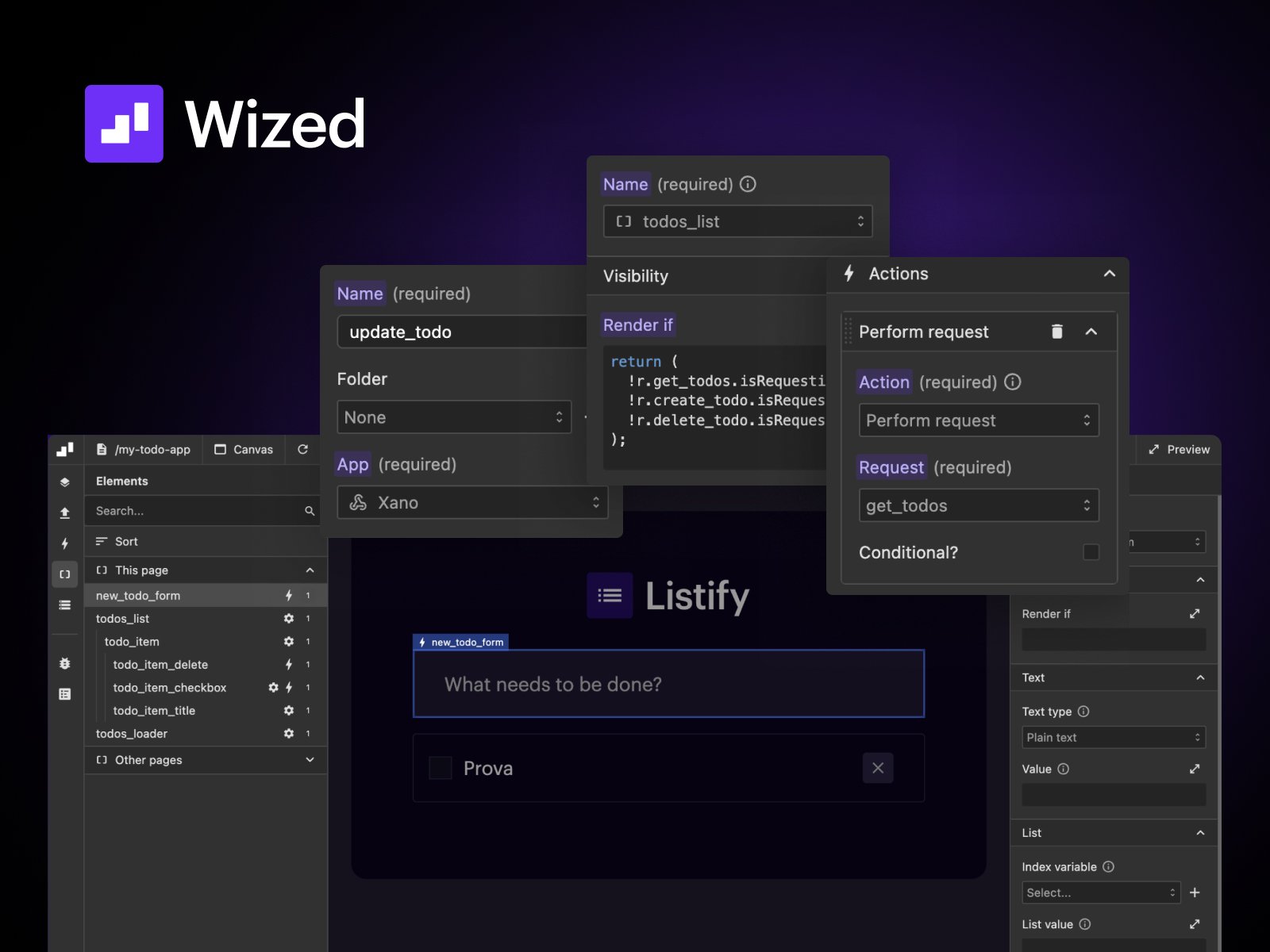
Wized describes itself as a visual JavaScript framework for Webflow. Its configurator can target eligible Webflow elements, react to user input, maintain state, call APIs and change what the visitor sees. The product includes a function editor for logic that cannot be expressed solely through predefined actions. In other words, it is more accurately described as low-code than as a zero-logic, no-code backend.
The official Wized introduction and JavaScript API documentation explain the model and ways to extend it with code.
How Webflow, Wized and a backend work together
Webflow builds the screens
Design the layout, responsive rules, typography and elements in Webflow. Then connect the Webflow staging URL in Wized, add its script and identify the elements you want to control. Wized's configurator works over that existing interface; it is not another general-purpose visual layout builder.
Wized handles interactive frontend logic
A button can initiate a request, a response can update a variable, and an element can display new text or a rendered list without loading a new page. Wized provides global events, conditions, actions, requests and a data store. Custom JavaScript remains available for edge cases. The workflow is visual, but understanding the sequence of events and responses still matters.
A backend owns sensitive data and authorization
Wized can communicate with Xano, Supabase, Firebase, Airtable and REST endpoints, but it should not be confused with a database or an authentication provider. The Wized request documentation explicitly states that Wized does not perform authentication itself; it coordinates the necessary API calls. A protected page or hidden button is not a security boundary. Permissions must be enforced by the backend that returns or changes the data.
See Wized's request documentation and secret-storage guidance for the product's own explanation of these boundaries.
A practical example: an authenticated customer portal
Consider a service company that wants clients to log in, see project status, upload details and update their profile. Webflow would provide the visual page and form controls. Wized could trigger a login request to a chosen authentication service, render project records returned by an API and update the interface when a customer changes information. The backend would verify identity, determine which records the customer may access and persist the changes.
This is a hypothetical implementation pattern, not an Igorev Agency case study. Its value is that it makes the division of responsibility clear. Wized organizes what happens in the browser; authentication and authorization remain independent technical decisions.
What can Wized actually build?
Dynamic listings, search and booking experiences
An API-backed listing can filter by multiple inputs, update results and display availability without a full page refresh. That can be useful for travel, property, product selection or booking flows. Whether the experience is truly real time depends on the underlying API, caching, refresh logic and data quality, not simply on installing Wized.
Member dashboards and personalized interfaces
Wized can render different data and states after a successful authentication flow. A learning platform might show a learner's progress; a client portal could display their project records. This is more flexible than static gated content, but also requires proper server-side permissions and thorough testing of expired sessions and access-denied states.
Forms, integrations and workflows
For multi-step forms, Wized can manage conditional questions, state and submission requests. It can send data to a REST service and respond to success or error events. A conventional Webflow form may still be a better option for a simple inquiry flow with one destination.
Wized documents its event actions and REST requests separately. Those are useful starting points when deciding whether the product's model fits your requirements.
Public case studies: what the product has been used for
Antarctica21: custom booking on top of an existing booking engine
In a Wized-published customer story, Nexus Creative built a custom expedition finder and cabin booking interface for Antarctica21. Wized powers interactive filtering, cabin selection and pricing presentation; Xano acts as middleware between the interface and the existing RezMagic API. This is a strong example of Wized's value as an integration layer when a company's backend cannot be replaced. The outcomes and performance figures in the original story are reported by the vendor and project team, not independently audited by Igorev Agency.
Read the Antarctica21 case study for the implementation details.
StudioForm Pro: Wized alongside Memberstack and Xano
Another published project, StudioForm Pro by BMG studio, combines Wized with Memberstack and Xano for accounts, subscriptions and application features. It illustrates why these tools should not be treated as mutually exclusive products. Wized can orchestrate parts of the interface while other services perform authentication and store data.
Source: BMG studio's public Wized case study.
Wized vs Webflow CMS, Memberstack and custom code
Wized vs Webflow CMS
Webflow CMS is for structured website content such as articles, cases, services and locations. If editors mainly publish information, CMS templates usually deliver a simpler workflow. Wized becomes relevant when data needs to be fetched or modified per visitor, when actions depend on application state, or when the underlying records live in an external backend. Both can coexist on a hybrid site.
Wized vs Memberstack
Memberstack centers on user accounts, memberships, gated content and subscription-related features. Wized centers on frontend requests, state and interactions. They overlap in the interfaces they help create, but they are not direct substitutes. If the requirement is only a login and a protected content area, first evaluate a membership platform. If the authenticated user must manipulate substantial application data, an additional logic layer might be justified.
Wized vs custom JavaScript
Custom JavaScript removes the Wized subscription and provides direct implementation control, but requires more frontend engineering and maintenance discipline. Wized offers a visual organization for requests and states that can lower the barrier for Webflow specialists. This is not automatically cheaper: complex visual logic still needs debugging, conventions and tests. The break-even point depends on the team and project.
Wized vs a dedicated application frontend
Frameworks and app-focused visual builders may be better suited when the application dominates the project, rather than sitting alongside a Webflow marketing website. The trade-off may involve giving up the existing Webflow interface or maintaining a separate application frontend. For a heavily interactive product, compare architecture, deployment, source-code control, observability and security requirements before choosing a tool.
Wized pricing in 2026: what the plans include
Wized publishes monthly and yearly billing options per project or domain. The pricing page checked in October 2026 shows the following monthly rates, with the lower price representing the advertised per-month equivalent when billed yearly. These are Wized charges only, not the total cost of hosting a Webflow-powered application.
Free, Lite and Small
Free is $0 and supports staging rather than a custom production domain. The Free plan lists unlimited staging page views and Elements. Lite is $12/month on monthly billing, or $9/month with yearly billing, with up to 20 Wized Elements and 100,000 monthly page views. Small is $39/month monthly, or $29/month billed yearly, allowing 100 Elements and 100,000 monthly page views. Both paid plans list a single production domain.
Medium, Large and Enterprise
Medium is $69/month monthly or $59/month billed yearly, with 400 Elements and 200,000 monthly page views. Large is $169/month monthly or $149/month billed yearly, with unlimited Elements and 300,000 monthly page views. Both list multi-domain and wildcard-domain support. Enterprise is custom quoted, with dedicated infrastructure and additional support options.
The free tier is valuable for experimenting before launch. For a published project, the Element limit can become just as relevant as the page-view allowance. Wized's pricing FAQ says that if you exceed a quota, the company will contact you about upgrading rather than immediately taking the app offline. That is a documented policy, not a reason to ignore plan limits.
Verify live figures and terms on the official Wized pricing page before purchasing. The Wized, Webflow, backend and any other third-party subscriptions should be budgeted separately.
The real cost is the whole stack
A realistic budget for a client portal should include Webflow hosting, Wized, an authentication or backend provider, data/API usage, integration work and ongoing maintenance. A $9/month advertised Wized Lite price does not mean the entire application costs $9/month. It also does not include design, QA, security review or content operations. For larger systems, compute total cost from the expected usage and feature requirements, not just the price of one plugin.
Security, SEO and performance: three areas not to shortcut
Security: frontend visibility is not authorization
Sensitive records require server-side access checks. Wized offers encrypted Secrets and server-executed requests using those secrets, which is useful for protecting API keys, but it does not eliminate the need for backend authentication, role checks and safe API design. Test unauthorized requests directly, not only the visibility of a button in the browser.
SEO: distinguish public content from client-rendered app data
For a public marketing or directory page that needs organic search visibility, check what search crawlers can actually see in the initial HTML. Data injected after JavaScript runs may require a separate publishing or prerendering strategy. The right architecture often retains public, indexable content in Webflow CMS while using Wized for interactive, user-specific functionality. That is an SEO consideration, not a documented Wized prohibition.
Performance: measure loading and request behavior
A dynamic application can feel responsive after its first request while still loading slowly or exposing empty states on weak connections. Evaluate script initialization, request waterfalls, loading placeholders, API latency, error responses and mobile behavior. No independently verified benchmark in this review shows Wized is faster or slower than a custom frontend.
What developers should know about the learning curve
Wized can reduce the amount of hand-written browser code, but it does not remove concepts such as REST, JSON, authorization, state changes or error handling. A Webflow designer who has never worked with APIs will need time to learn those ideas. Developers familiar with JavaScript may find it easier to reason about the product while still needing to learn the configurator's conventions.
Community reports are mixed: some builders appreciate the ability to ship application features within Webflow, while others have found complex configurations awkward or expensive once several services are combined. These are individual experiences rather than controlled comparisons, and Wized has shipped interface improvements since some older comments were written.
A useful community discussion is this Webflow client-portal thread, where builders describe both successful production use and stack-level maintenance concerns.
Wized discount code
Igorev Agency has a partner discount code for Wized: IGOREV10, intended to provide 10% off eligible Wized purchases.
Enter the code in checkout and confirm the discount applies to your selected plan before paying. We have not independently tested a Wized checkout transaction for this review, so we cannot promise the code will apply to every plan, renewal or billing configuration.
Affiliate disclosure: Igorev Agency has a commercial relationship with Finsweet products and may receive a commission from qualifying purchases. That does not change this article's scope: it is a desk-researched editorial assessment, not a hands-on Wized implementation review.
FAQ: quick answers before choosing Wized
Is Wized a backend?
No. It coordinates frontend interactions and API calls; you still need services responsible for data persistence, authentication and server-side authorization.
Can Wized be used for free?
Yes, the Free plan supports development and testing on a Webflow staging domain. Publishing to a custom production domain requires a paid plan under the current pricing rules.
Does Wized replace Memberstack?
Not as a general rule. Memberstack addresses membership and identity workflows, while Wized orchestrates dynamic frontend logic. Some applications use both.
Is Wized suitable for a large SaaS product?
It depends on the product's architecture and operational needs. Published customer stories show complex implementations are possible, but that is not a guarantee that the stack is the best choice for every high-scale SaaS. Test security, performance, maintainability and backend limits against the real specification.
Final verdict: when we would choose Wized
Wized is worth considering when Webflow already provides the right design and editing experience, but the site needs a real application layer connected to external data. The free staging option makes a proof of concept sensible. It is much less compelling for static marketing pages, simple content gating or teams unwilling to own an additional integration stack.
We would evaluate a small, representative workflow before choosing Wized for a client: one authenticated request, one protected data operation, an error state, a mobile loading state and a basic performance audit. If that prototype remains understandable and maintainable, Wized deserves a place on the shortlist. If not, a custom frontend or simpler stack may be the better investment.
Official resources and further reading
Product references: Wized pricing, Wized documentation and Wized customer case studies.
Related Igorev Agency guides: Webflow CMS architecture, Webflow vs headless CMS and Figma-to-Webflow development.